Extending the Contao Schema Manager with your own data
-
8 min
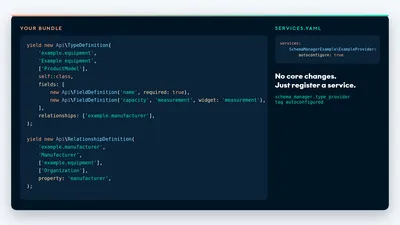
Since version 1.4, you can extend Contao structured data with records from your own bundles: the Schema Manager takes them through a versioned API, with no fork and no SQL into core tables. Here's how to connect types, relationships and a data source, and where the limits are.
What is the Contao Schema Manager Extension API, and who needs it?
The Extension API is a versioned interface that lets other bundles contribute their own data to the Schema Manager's schema graph. It has been available since version 1.4.0 of 22 October 2026 and lives in the namespace VHUG\SchemaManagerBundle\Extension\V1. The details are in the API documentation.
It's meant for you if you maintain a bundle of your own: real estate, job listings, equipment, catalogues. Their data should show up in the JSON-LD without you forking the Schema Manager. If you don't know it yet, read the announcement first. How structured data works in general is covered in the article on schema markup.
Why isn't the Schema Manager core enough?
The core extension knows its own entities, such as organisation, people, services, locations (mainly for events), pages, news and events. What it lacks is data from other bundles with their own tables: no equipment database, no property inventory. The API's goal: your bundle stays the source of the data, and the core takes care of the rest.
In practice your bundle describes which types, fields and relationships it has, and returns records on request, while identity, graph assembly and serialization stay in the core, so you don't have to worry about unique IDs or the output format. You never write SQL into core tables.
How is the Extension API built?
You implement up to six interfaces, and because one class may carry several of them the effort stays manageable. Autoconfiguration marks each one with a tag. The core collects them, validates their metadata at compile time, builds the graph and serializes the JSON-LD. Mappers cannot emit arbitrary references, contexts or sibling entities.
Three more interfaces you only call: BindingManagerInterface, EntityEditorInterface and SourceInvalidatorInterface. Compilation validates the metadata and aborts on errors. Duplicate keys, unknown endpoints or missing services therefore show up there, not in the output.

One tag per interface
| Interface | Tag |
|---|---|
SourceAdapterInterface |
schema_manager.source_adapter |
TypeProviderInterface |
schema_manager.type_provider |
RelationshipProviderInterface |
schema_manager.relationship_provider |
EntityTypeMapperInterface |
schema_manager.type_mapper |
EntityTypeValidatorInterface |
schema_manager.type_validator |
PayloadMigrationInterface |
schema_manager.payload_migration |
What does a minimal provider look like?
The example bundle examples/extension in the repository shows a provider for fictional equipment. It is synthetic and never auto-registered: you import its services.yaml only in a development application, after setting up the PSR-4 namespace SchemaManagerExample (example bundle).
The excerpts below come from it, only line-wrapped for readability. Always check the names against the version you have installed.
Registration through autoconfiguration
With autoconfigure: true, Symfony recognises the interfaces and sets the tags itself. One class may carry several interfaces: the ExampleProvider is type provider, relationship provider and mapper in one. Providers are declarative services without required constructor arguments, while the adapter may inject repositories and routing services.
# services.yaml
services:
    SchemaManagerExample\ExampleProvider:
        autoconfigure: true
    SchemaManagerExample\ExampleSourceAdapter:
        autoconfigure: true
        arguments:
            $stateFile: '%kernel.project_dir%/var/schema-example-source.json'
A type with typed fields
A type has a namespaced key such as example.equipment, and its Schema.org type here is ProductModel. The field capacity is a measurement made of value, unit and basis, in the example a rated power in kW. The three parts stay separate because a bare value says little: for a living area, say, only the basis (for example DIN 277) makes the value comparable. Field keys are local identifiers, and changing a label never retypes an existing identity.
// ExampleProvider.php (excerpt)
use VHUG\SchemaManagerBundle\Extension\V1 as Api;

public function types(): iterable
{
    yield new Api\TypeDefinition(
        'example.equipment',
        'Example equipment',
        ['ProductModel'],
        self::class,
        fields: [
            new Api\FieldDefinition('name', required: true),
            new Api\FieldDefinition('description', localized: true, widget: 'textarea'),
            new Api\FieldDefinition('capacity', 'measurement', widget: 'measurement'),
            new Api\FieldDefinition('notes', widget: 'textarea'),
        ],
        relationships: ['example.manufacturer', 'example.related'],
        properties: ['name', 'description', 'additionalProperty'],
    );
}
Relationships and mapper
The fourth parameter of TypeDefinition, here self::class, is the service ID of the mapper. properties lists the predicates the mapper may emit. You declare relationships one direction at a time, there is no automatic inverse. allowCycles: false forbids cycles for example.related.
// ExampleProvider.php (excerpt, same class)
public function relationships(): iterable
{
    yield new Api\RelationshipDefinition(
        'example.manufacturer',
        'Manufacturer',
        ['example.equipment'],
        ['Organization'],
        property: 'manufacturer',
        multiple: false,
    );
    yield new Api\RelationshipDefinition(
        'example.related',
        'Related equipment',
        ['example.equipment'],
        ['example.equipment'],
        allowCycles: false,
    );
}

public function map(Api\ResolvedEntity $entity, Api\MappingContext $context): Api\NodeContribution
{
    $properties = array_intersect_key($entity->fields, array_flip(['name', 'description']));
    if ($measure = $entity->fields['capacity'] ?? null) {
        $properties['additionalProperty'] = $context->measurement(
            $measure['value'],
            $measure['unit'],
            $measure['basis'],
        );
    }

    return new Api\NodeContribution($properties);
}
Connecting the data source
The SourceAdapter connects your data to the graph. key() and describe() are pure metadata and must not depend on constructor state. findCandidates() returns safe summaries for search, 50 per page by default and 100 at most, without binding or publishing anything. resolve() returns either an immutable snapshot (a point-in-time copy of the fields) or a status such as missing, unpublished or forbidden, in which case it carries no facts.
Binding creates a draft. You link an existing identity explicitly, never by name or URL matching. Publishing continues through the normal Contao editing workflow.
The sketch below uses the real method names from the example adapter. EquipmentRepository stands for your own repository and isn't part of the API.
// EquipmentSourceAdapter.php (sketch, not copied from the example bundle)
use VHUG\SchemaManagerBundle\Extension\V1 as Api;

final class EquipmentSourceAdapter implements Api\SourceAdapterInterface
{
    public function __construct(private readonly EquipmentRepository $equipment) {}

    public function key(): string
    {
        return 'example.inventory';
    }

    public function describe(): Api\SourceDefinition
    {
        // type keys, source-owned global fields, source-owned localized fields
        return new Api\SourceDefinition(['example.equipment'], ['name'], ['description']);
    }

    public function findCandidates(Api\CandidateQuery $query): Api\CandidatePage
    {
        if (!$query->context->authorized) {
            return new Api\CandidatePage([]);
        }

        $items = [];
        foreach ($this->equipment->search($query->search, $query->limit) as $row) {
            $items[] = new Api\Candidate(
                new Api\SourceReference($this->key(), $query->context->site, (string) $row->id),
                $row->name,
                'example.equipment',
                $row->revision,
            );
        }

        return new Api\CandidatePage($items);
    }

    public function resolve(Api\SourceReference $source, Api\ReadContext $context): Api\SourceResolution
    {
        if ($source->installationScope !== $context->site) {
            return new Api\SourceResolution('forbidden');
        }

        $row = $this->equipment->find($source->subjectKey);
        if ($row === null) {
            return new Api\SourceResolution('missing');
        }
        if (!$row->isPublished() && $context->purpose !== 'preview') {
            return new Api\SourceResolution('unpublished');
        }

        return new Api\SourceResolution('available', new Api\SourceSnapshot(
            $source,
            $row->revision,
            'example.equipment',
            ['name' => $row->name],
            ['description' => $row->description($context->language)],
            $row->url,
        ));
    }
}
How do identity and authority of a source work?
Every record is identified by a SourceReference made of adapterKey, installationScope and the immutable subjectKey. Each entity has exactly one authoritative source. Its fields stay read-only even when empty, and there is no write-back API.
Use the business ID from your own system as subjectKey if imports recreate rows. Row IDs, page IDs, aliases and localized homes stay separate things. Translations share one subject, and one row can expose several explicit subjects.
Automatic sources, new in 1.4.0
New in 1.4.0 are automatic sources: with SourceDefinition(automatic: true) you declare that every fact and relationship belongs to the original record. You persist the public ID there and return it through SourceSnapshot(publicIdentity: ...). You adopt already published IDs through an explicit migration and never allocate replacements. For new and copied records you generate fresh IDs.
We checked automatic sources, among other places, on the live site of our client OKAL: 449 automatic sources, unchanged public IDs, 251 public source pages, 72 public news articles and 31 relationship graphs for show homes.
Automatic rows are absent from the manual editors, and the Schema Manager rejects supplementary writes to them. Existing adapters stay at automatic: false and keep their editing workflow. Set automatic: true only if every field of your types really belongs to the source, otherwise leave it off: supplementary fields such as notes in the example above would be ignored at runtime.
// Sketch, derived from the signatures of SourceDefinition and SourceSnapshot
// automatic: true only if ALL fields and relationships of the type belong to the source.
// If even one field does not (a supplementary one, say), leave automatic off.
public function describe(): Api\SourceDefinition
{
    return new Api\SourceDefinition(
        typeKeys: ['example.equipment'],
        ownedGlobalFields: ['name', 'capacity', 'notes'],
        ownedLocalizedFields: ['description'],
        ownedRelationships: ['example.manufacturer', 'example.related'],
        automatic: true,
    );
}

// in resolve(): return the ID stored on your original record
new Api\SourceSnapshot(
    source: $source,
    revision: $row->revision,
    typeKey: 'example.equipment',
    globalFields: ['name' => $row->name, 'capacity' => $row->capacity, 'notes' => $row->notes],
    localizedFields: ['description' => $row->description($context->language)],
    url: $row->url,
    relationships: $row->relationships(), // placeholder for your relationship values
    publicIdentity: $row->publicId,
);
What happens when a source fails, and how does the cache stay fresh?
If a provider or adapter is missing, the Schema Manager outputs nothing in that case (fail closed). Stored identities and payloads are kept and come back when you reinstall, and no automatic cleanup deletes anything. Following relationships is limited to one supporting step and 100 identities.
For the cache, you call SourceInvalidatorInterface::changed() after a committed change to one source record, or adapterChanged() after an import, routing or configuration batch. If you hold an outer transaction, invalidate after its commit. Visibility deadlines such as nextVisibilityChange clamp the HTTP cache lifetime.
Version 1 deliberately invalidates one shared extension tag instead of keeping a reverse-dependency index. That's the conservative choice: all schema responses carry it, including missing or unpublished ones.
// Sketch: clear the cache after a committed change
use VHUG\SchemaManagerBundle\Extension\V1\SourceInvalidatorInterface;
use VHUG\SchemaManagerBundle\Extension\V1\SourceReference;

final class EquipmentSaveListener
{
    public function __construct(private readonly SourceInvalidatorInterface $invalidator) {}

    public function afterSave(string $site, string $subjectKey): void
    {
        // single record, after the commit
        $this->invalidator->changed(new SourceReference('example.inventory', $site, $subjectKey));
    }

    public function afterImport(): void
    {
        // import, routing or configuration batch
        $this->invalidator->adapterChanged('example.inventory');
    }
}
How do versions and migrations work?
Every type carries a schemaVersion. If it doesn't match the stored data, the Schema Manager reports migration_required and emits no stale payload. You register consecutive PayloadMigrationInterface classes and run them first as a dry run, then with --apply.
The dry run writes nothing. --apply checks version and revision atomically, validates the transformed payloads, preserves identity and source authority, and invalidates the output. A migration never runs on render. Renames of type keys or relationship keys need a separately reviewed migration. The code sketches in this post are derived from the real signatures, meant as illustration and were not executed by us.
// Sketch: supplementary field capacity becomes ratedCapacity in version 2
// Also change the FieldDefinition key in the type to 'ratedCapacity'
// and set schemaVersion: 2 in the TypeDefinition.
use VHUG\SchemaManagerBundle\Extension\V1 as Api;

final class EquipmentCapacityRename implements Api\PayloadMigrationInterface
{
    public function typeKey(): string
    {
        return 'example.equipment';
    }

    public function fromVersion(): int
    {
        return 1;
    }

    public function toVersion(): int
    {
        return 2;
    }

    public function global(array $values): array
    {
        if (array_key_exists('capacity', $values)) {
            $values['ratedCapacity'] = $values['capacity'];
            unset($values['capacity']);
        }

        return $values;
    }

    public function localized(array $values, string $language): array
    {
        return $values;
    }
}
php vendor/bin/contao-console schema-manager:extension:migrate ENTITY_ID
php vendor/bin/contao-console schema-manager:extension:migrate ENTITY_ID --applyWhere are the limits of the Extension API?
Version 1 is deliberately narrow. The console for extension data is administrator-only, and we ship neither project adapters nor an industry catalogue. The example bundle is synthetic. The list below names the limits one by one.
-
Console for administrators only
Integrating bundles can offer their own permission-aware workflows for other users through the public interfaces. -
No project adapters, no industry catalogue
You write types, relationships and adapters yourself. Creating, binding and publishing entities stays manual in v1. -
Pending vocabulary is off by default
Pending predicates need a pending relationship declaration and the parameterschema_manager.extension.allow_pending=true. You can approve single relationship keys throughschema_manager.extension.approved_pending_relationships. -
Valid vocabulary is no rich-result promise
A property fitting the Schema.org vocabulary says nothing about rich results. We promise no rankings or AI citations, the evidence is thin, as our article on schema markup explains. -
No write-back
There is no write-back or override API. Rendering triggers neither source writes nor AI calls.
Where do you start?
Install version 1.4 or newer, apply Contao's additive database updates and rebuild the cache. Then read the example bundle and the tests: the repository ships composer test and tests/extension-integration.php, which you run in an installed application.
The API documentation is on GitHub, the package on Packagist. Features and installation of the extension itself are on the extension page.
composer require vonheldenundgestalten/contao-schema-manager:^1.4 --with-all-dependenciesFrequently asked questions about the Extension API
-
No. You register Symfony services with the tags of the public interfaces in the
Extension\V1namespace. Classes underInternal, existing models and emitters are implementation details. SQL into core tables is not intended. -
No. There is no write-back or override API. Fields your source owns stay read-only, even when empty. The Schema Manager stores supplementary fields as its own typed values, and automatic sources don't get those either.
-
The Schema Manager outputs nothing in that case (fail closed): the output is omitted, while stored identities and payloads are kept. If you reinstall the bundle, the identities come back. There is no automatic destructive cleanup.
-
Raise the type's
schemaVersionand register aPayloadMigrationInterfaceclass. Runschema-manager:extension:migrate ENTITY_IDas a dry run first, then with--apply. Renames of type keys or relationship keys need a separately reviewed migration. -
Yes, but only deliberately. The default is off. You need a pending relationship declaration and
schema_manager.extension.allow_pending=true, or you approve single keys throughschema_manager.extension.approved_pending_relationships.
The full API documentation is on GitHub, features and installation of the extension are on the extension page.

Markus Milkereit
Founder & Lead Developer
Writes about accessibility, maintainable front-ends and the unglamarous parts of running a website well.